How to track scrap and non-conformities in a factory
Rejected goods left in a corner still count as stock. How to inspect at each stage and class each batch as conforming, second choice or scrap, with a trace.
There is a pallet at the end of the workshop that nobody quite claims. It failed something, someone remembers, or it may be waiting for a decision. The quality manager has a note about it in a notebook. The stock file still counts it as finished goods. A salesperson may well sell it next week.
Rejected production is a normal part of industry, and every factory has some. What differs from one company to the next is whether it stays visible, in figures that management can read, or whether it slips into a corner where it costs money without anyone recording it.
What happens to goods nobody has qualified
When quality lives in a notebook or a separate file, each department ends up with its own idea of what that pallet is. Stock sees goods. Quality sees a problem. Sales sees something available to promise. Finance sees a value on the balance sheet that may be well above what those goods could fetch.
The second effect takes longer to show. A defect that is only noted locally cannot be counted. If nobody can say how much was rejected this month, on which product and at which stage, then the same defect can come back again and again, and the conversation about it stays anecdotal. The workshop says it is rare, quality says it is frequent, and neither has the figure.
Inspecting at each moment that matters
FlexiERP follows quality inspections at each of the moments where a problem can be caught:
- at receipt, when materials arrive from the supplier;
- in progress, during production;
- final, on the finished product;
- before shipping, when goods are about to leave.
Non-conformities are recorded in the same application, so they stay attached to what they concern. Catching a bad material at receipt spares you the labour of turning it into a bad product, and that is a matter of the inspection happening at the right moment on a record that everyone reads.
Three outcomes, each with its own path
After inspection, a batch does not stay in between. It gets qualified, and each outcome has a consequence:
- Conforming: it goes into finished goods stock.
- Second choice: it is downgraded and sold at a reduced price.
- Scrap: it is qualified and traced, then recovered or written out of stock.
The second choice is where the money tends to get lost in many workshops. A product with a cosmetic flaw is often worth something, but only if it exists as a distinct thing in the system, with its own price, and not as a good product someone remembers to discount. In FlexiERP the downgrade and its sale are traced like any other movement, so the stock figure and the salesperson’s screen agree about what is on the shelf.
Scrap gets the same treatment. It is moved, recorded and written off or recovered, which means it leaves the stock on purpose and with a trace, and does not just vanish at the next count.
What the director can read
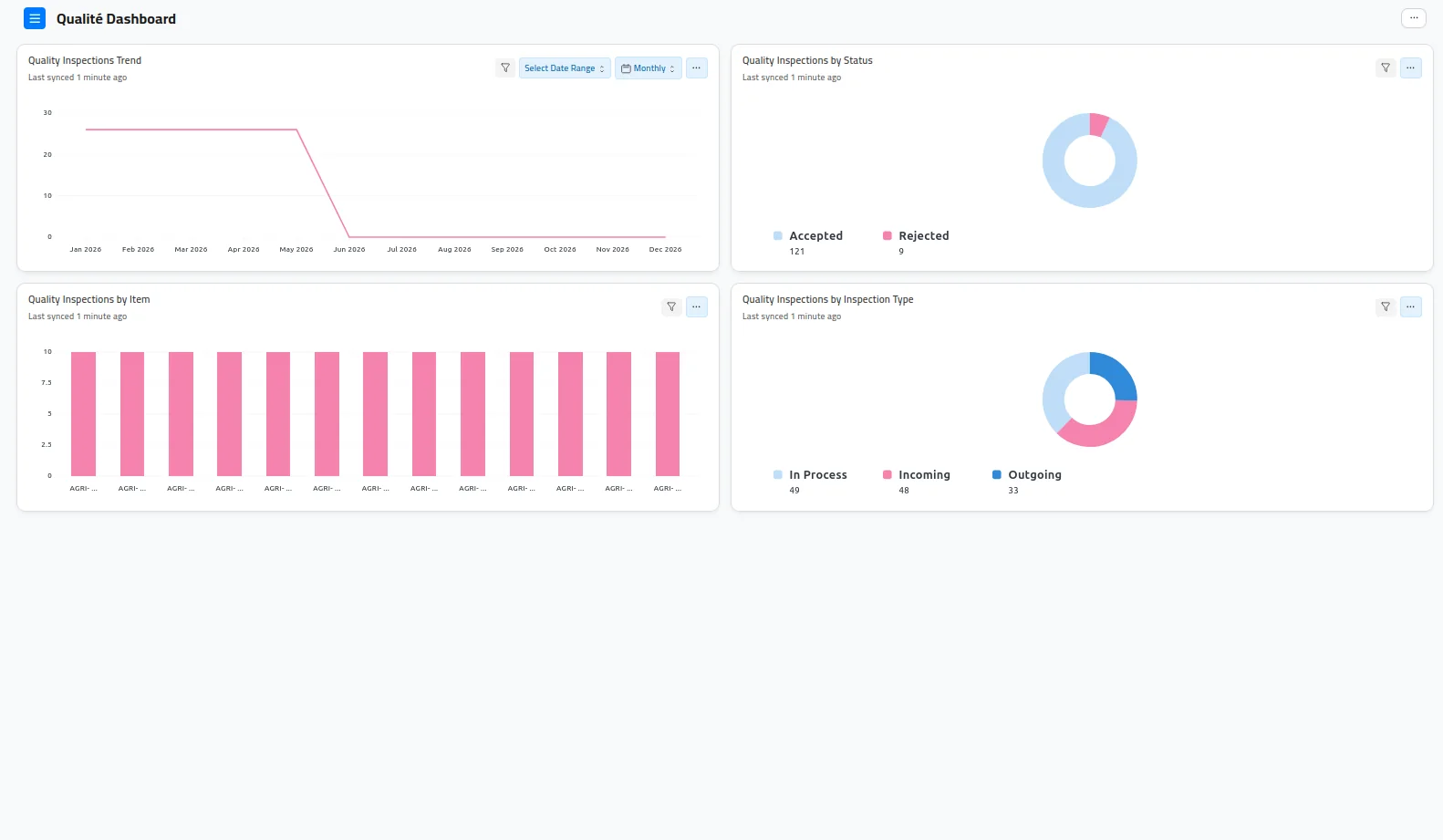
The quality dashboard shows inspections, non-conformities, and scrap qualified and traced. It sits beside the seven other department dashboards and feeds on the same data, so a discussion about quality between the workshop and management starts from one set of figures.
Control is also part of this. Each job sees its own screens, so operators can have a simple one for their inspections, and quick apps exist for this kind of everyday task, with no need to go through the whole ERP. Approval paths are set by the company if a decision on a batch has to go through a manager. Every change stays in the audit trail, which means that a batch reclassified from scrap to second choice shows who made the call.
The pallet at the end of the workshop now has a status, and anyone with access to that screen can read it.